
CleanMyMac Alternative vs a One-Time Disk Map
CleanMyMac is a subscription maintenance suite. FreeUpMac is a free on-device treemap with a $12.99 USD Pro unlock. Here is when each product actually fits.
- CleanMyMac
- Comparison
- Pricing
CleanMyMac (MacPaw) is a polished suite: junk cleaning, malware scans, update helpers, login items, duplicates, and a Space Lens treemap — behind a monthly or annual subscription. Typical street pricing lands around $35–40 per year, sometimes more with bundles.
FreeUpMac does one job: draw the disk as a map on your Mac so you decide what to remove. The scan is free. Pro is $12.99 USD once for Trash / Bin, Reveal in Finder, and local Time Machine snapshots. No account to look around.
This is not a hit piece. If you want Smart Care and malware tools in one window, CleanMyMac is built for that. If your problem is “disk full, I cannot see why,” a map is the shorter path.
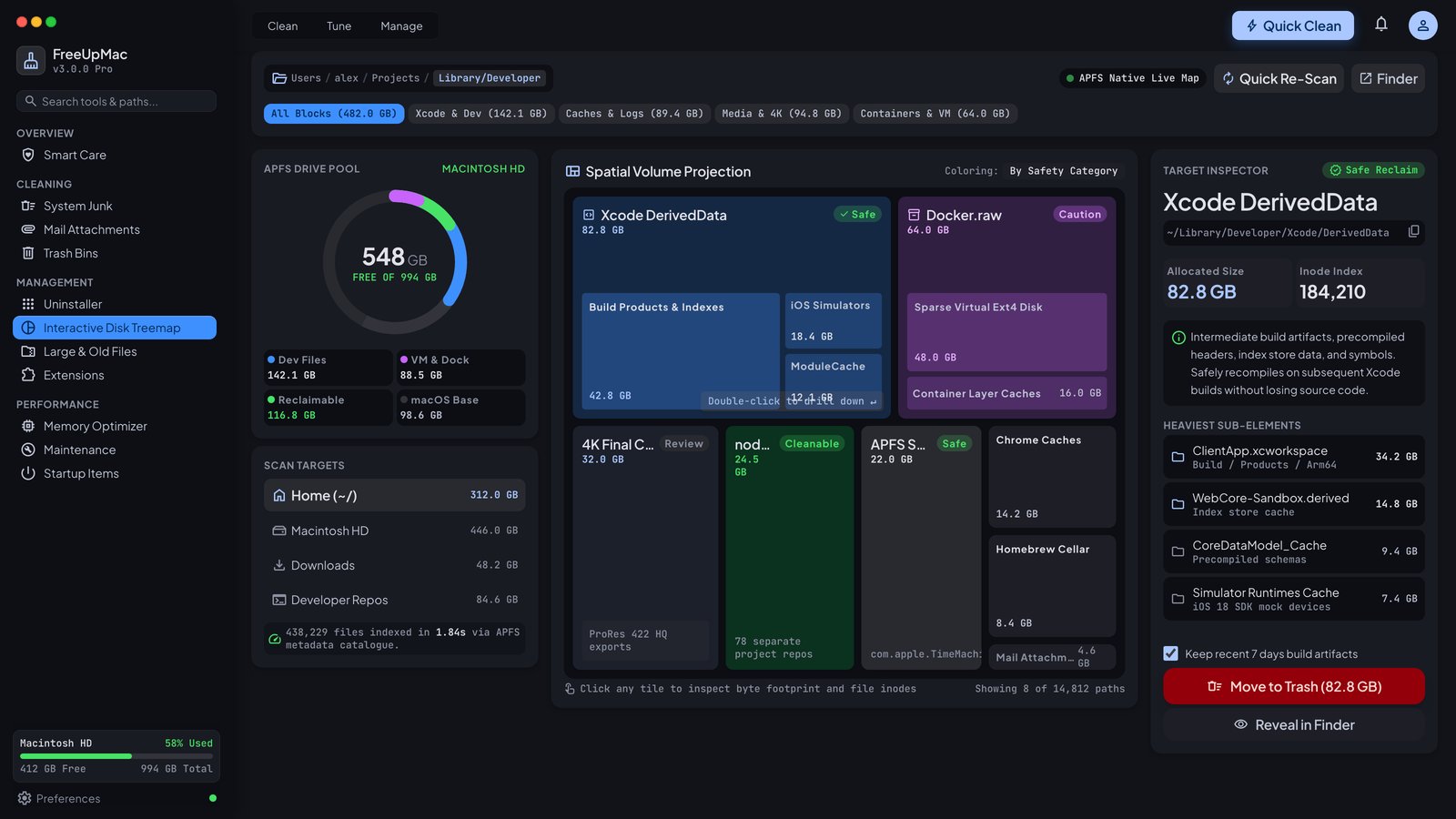
What you are actually buying
| CleanMyMac | FreeUpMac | |
|---|---|---|
| Main idea | Maintenance suite | Disk map |
| Scan cost | Trial, then subscription | Free |
| Cleanup | One-click modules + Space Lens | You select blocks; Pro moves to Trash |
| Cloud account | Yes, for the suite | No |
| Malware / updater | Yes | No |
| Price shape | Yearly (or monthly) | $12.99 USD once |
| Data | Suite + cloud account | On-device map |
MacPaw is a large, well-known vendor in the US, UK, and EU. That brand is worth something if you want a single paid utility belt. It is expensive if you only needed to see System Data.
When CleanMyMac fits
- You want malware scanning, uninstaller leftovers, and cleanup in one app.
- You are fine paying every year.
- You like Smart Care and do not want to inspect paths.
- You already live in the MacPaw account for other apps.
When FreeUpMac fits
- The Mac says storage is almost full and Settings shows System Data or Other.
- You already have separate backups and maybe a malware tool you trust.
- You hate subscriptions for a tool you open once a quarter.
- You want DaisyDisk-style blocks with labels for Xcode, Docker, caches, and iOS backups.
- You want checkout in USD with cards from the US, UK, EU, Canada, and Australia, and a 15-day refund — pricing.
Space Lens vs a map-first app
CleanMyMac’s Space Lens is a real treemap inside a larger product. FreeUpMac is map-first: the welcome screen, the scan, the inspector, and the largest-files list are the product. You can download it, scan Home, and close it without paying. Pro is only the moment you want to act on a block without Finder.
Honest split: if you need antivirus, get a dedicated antivirus or CleanMyMac. If you need to see why a 256 GB drive is full, get a map. Using both is possible; paying a yearly suite only for Space Lens is how people end up searching “CleanMyMac alternative.”
Privacy difference that matters in the EU and UK
FreeUpMac does not upload file names or paths. There is no product account. Checkout goes through Dodo Payments for the license email. CleanMyMac’s suite is a signed-in product with its own privacy policy — read it if GDPR/UK GDPR is on your checklist. Our policy is on /privacy.
What we will not claim
We will not claim CleanMyMac is fake junkware. We will not invent star ratings. We will not say a $13 map replaces malware scanning. We will say this: one-click cleaners hide paths; a map shows them. If you know the path, you can delete with confidence — to Trash / Bin, not a secret eraser.
Price over three years
CleanMyMac at about $40/year is about $120 over three years. FreeUpMac Pro is $12.99 once for the delete features. The suite still wins if you use the other modules every week. The map wins if you do not.
Try the free scan first
Download FreeUpMac, scan Home, and see whether the largest blocks are caches, snapshots, DerivedData, or Docker.raw. If the picture is enough, stay on the free tier. If you want in-app delete, unlock Pro. If you want a full suite, stay on CleanMyMac — just do not pay it only to stare at a grey System Data bar.
Related: 10-minute cleanup.
“Smart Care” versus inspecting a path
Smart Care is convenient when it deletes a cache you would have deleted anyway. It is opaque when it touches something you needed. A map is slower by thirty seconds and clearer by a mile. If you are happy outsourcing the decision, the suite is for you. If you got burned once, stop buying opacity.
App Store vs direct download
CleanMyMac is sold in more than one channel; terms and trial length differ. FreeUpMac is a Developer ID notarized .dmg from freeupmac.com/download — Apple Silicon and Intel — not a Mac App Store sandbox app. That is why Full Disk Access is a one-time System Settings step for This Mac scans.
Teams and families
A subscription that is “one Mac” or “one account” gets awkward when a household has three MacBooks. A one-time Pro key is simpler to restore by email. We still expect you not to post the key on a forum. For a 30-seat company that wants malware policy, buy a suite with an admin console — that is not this product.
Search intent
People type CleanMyMac alternative because of price, because of subscription fatigue, or because a cleaner scared them. This page is for the first two. If you need malware coverage, add that separately. If you need to see System Data, scan for free and stay map-first.
See your Mac as a map
Free download. Pro unlock is one-time ($12.99) — no subscription.
Related guides
DaisyDisk Alternative: Free Map, One-Time Pro
DaisyDisk is the classic paid Mac treemap. FreeUpMac is a notarized map you can scan for free, with a $12.99 USD unlock for Trash, Reveal, and snapshots.
DaisyDiskWhat Other Storage on a Mac Actually Means
Other (and System Data) is not a single folder. It is caches, snapshots, iOS backups, and leftover app files Settings will not list. Here is how to open it.
OtherLocal Time Machine Snapshots Filling Your Mac
macOS keeps local Time Machine snapshots on the internal SSD. They hide under System Data or Other and can eat tens of gigabytes until you delete them.
Time Machine