Fast local scans on Apple Silicon
The native app maps your home folder or the whole drive in seconds, so you are not waiting on a slow file walk.
Native Swift, not Electron
 FreeUpMac
Notarized native Mac app•Version 1.0.1•macOS 14.0+
FreeUpMac is a notarized disk treemap for macOS. The biggest blocks are the biggest wins. Scan for free. Unlock Pro once if you want Trash and snapshot cleanup from the app.
macOS 14.0+•3.1 MB•No account•Files never leave this Mac•Pro is $12.99 once
Notarized by Apple
Developer ID signed
100% on-device
Paths never leave this Mac
One-time license
$12.99 — no subscription
15-day refund
Email hello@freeupmac.com
The app
Built in SwiftUI for macOS. Scan locally, inspect the blocks that matter, and only pay if you want cleanup from the map.
See used versus free at a glance, then pick Home, This Mac, or a folder.
Volume stats from the disk
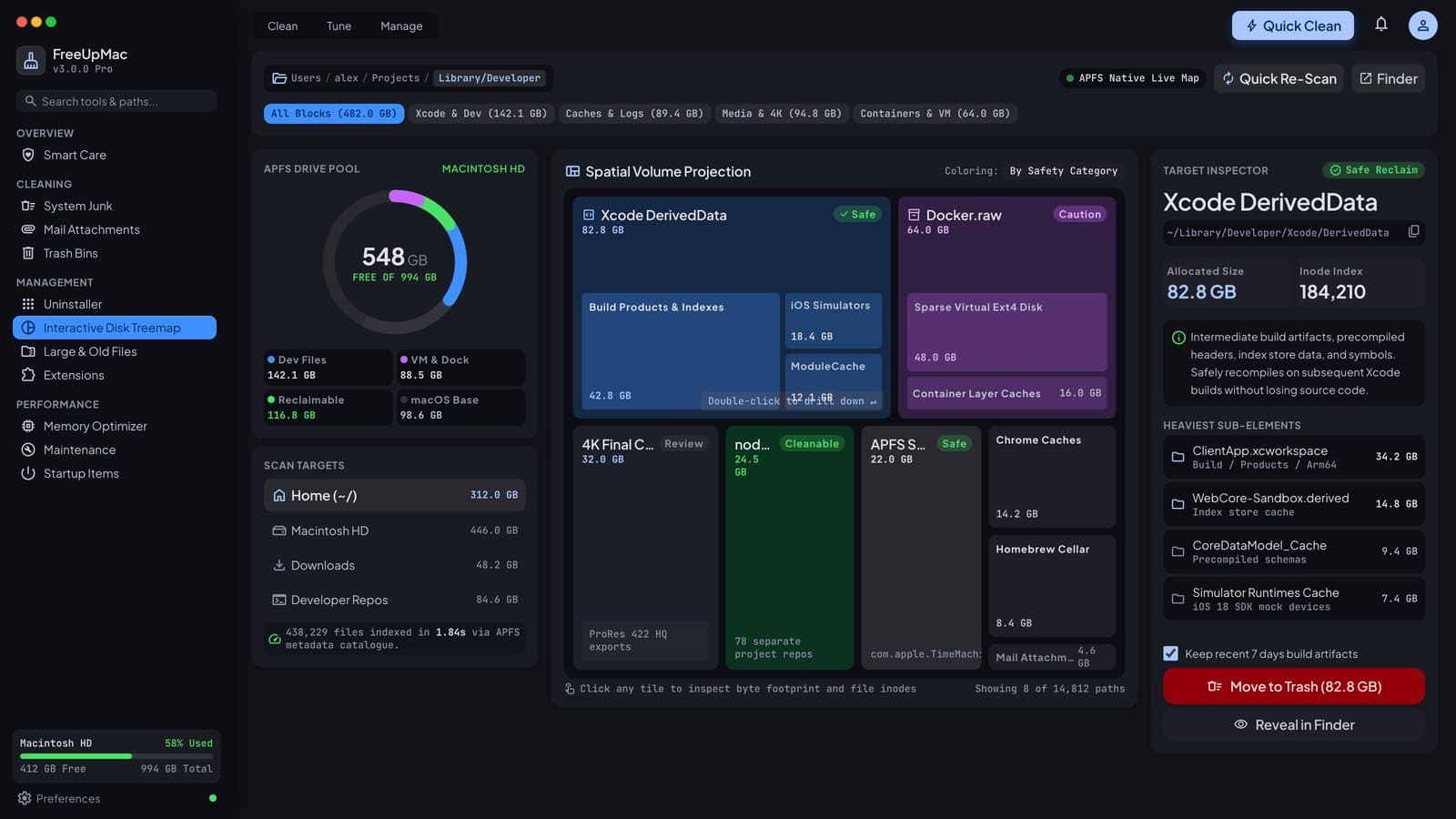
Every rectangle is real allocated space. Double-click a folder to zoom in.
Biggest block, biggest win
Path, size, and risk labels. Reveal is free. Pro moves selected items to Trash.
Deletes go to Trash
Features
Built in Swift for macOS 14+. No Electron shell, no cloud login, no scareware meter.
The native app maps your home folder or the whole drive in seconds, so you are not waiting on a slow file walk.
Native Swift, not Electron
The interactive treemap turns folders into rectangles. The biggest block is the biggest use of space, which is easier to judge than a scrolling Finder list.
Allocated size, not decimal GB
Scanning and mapping stay on your computer. File names and paths are not uploaded, and there is no account to create before you look around.
Paths never leave this Mac
DerivedData, Docker.raw, node_modules, caches, and iPhone backups are tagged Safe, Review, or Caution so you know what is safe to inspect first.
Honest risk labels
Jump from a huge file straight to its folder on the map, instead of hunting through nested directories in Finder by hand.
List and map stay in sync
The map stays free. Pro unlocks Trash and local Time Machine snapshot cleanup for a single payment. Reveal in Finder is free.
Pay once, keep the key
How it works
There is no signup. Open the app, pick Home or This Mac, and the map fills in on your machine.
Grab the Apple Silicon or Intel build from the download page. It is a small installer, not a background cleaner.
No helper tool or daemon
Pick a target on the welcome screen and watch the map fill in. Home is the safe first scan if you are not sure.
Home needs no extra permission
Click a block to see its path and size. Double-click a folder to zoom in, including the grey System Data area Apple does not explain.
Safe, Review, or Caution labels
Unlock Pro to move selected files to Trash. Nothing is force-deleted, so you can restore from Trash if you change your mind.
Deletes go to Trash
Compare
FreeUpMac does one job well: show you the disk, then let you choose what to remove. No junk scores. No monthly plan.
| RecommendedFreeUpMac | DaisyDisk | CleanMyMac | Finder | |
|---|---|---|---|---|
| See space as a map | Treemap | Treemap | Lists and junk scores | Folder list |
| Where files are read | On your Mac | On your Mac | Cloud account | On your Mac |
| Scan cost | Free map | Paid app | Trial | Free |
| Cleanup | $12.99 once | Paid | Subscription | Free |
| Notarized Mac app | Yes | Yes | Yes | No |
Pricing
Scan and Reveal in Finder stay free. Pay only if you want Trash (Bin on UK Macs) and local snapshot cleanup inside the app.
Free forever
$0 forever
Map the disk. Inspect every block. No account.
Pro
$12.99one-time
A lifetime license to clean up from the map.
15-day refund · Priced in USD. Checkout accepts cards from the US, UK, EU, Canada, Australia, and most other regions. No subscription.
Already paid? Restore your keyPartner program
FreeUpMac is a notarized disk map from Intellara Labs. If someone you send buys Pro ($12.99 once — not a subscription), you earn $6.50. We do not pay for downloads.
Monthly Wise or PayPal after a 15-day refund hold. Support is hello@freeupmac.com.
Buy with confidence
FreeUpMac is a notarized native app from Intellara Labs. Scanning stays on your computer. Support is hello@freeupmac.com.
Pro never force-erases. Restore from Trash if you change your mind.
Download, open, map. You only paste a license key if you buy Pro.
Apple Silicon and Intel builds are Developer ID signed and stapled.
Guides
Settings lumps caches, Xcode, Docker, backups, and snapshots into System Data or Other. These notes explain the usual hogs — then the app shows them as blocks.
10-min Guide
Mac storage full? A 10-minute cleanup path
Read the guide →System Data
What System Data actually hides
Read the guide →Deep Dive
What “Other” storage on a Mac really is
Read the guide →APFS Snapshots
Local Time Machine snapshots eating space
Read the guide →Developers
Reclaim space from Xcode DerivedData
Read the guide →Containers
Why Docker.raw still fills the disk
Read the guide →Web Dev
Find leftover node_modules folders
Read the guide →Alternatives
CleanMyMac alternative without a subscription
Read the guide →Alternatives
DaisyDisk alternative with a free map
Read the guide →FAQ
If your Mac has an M1, M2, M3, M4, or M5 chip, download Apple Silicon. Intel Macs (2017–2020, no M-series chip) use the Intel build. Not sure? Apple menu → About This Mac.
Yes. FreeUpMac only reads your disk to build the map. Nothing is deleted until you confirm, and deletions go to Trash (Bin on UK Macs) so you can restore them.
Your file structure never leaves your Mac. There is no account system and no cloud upload. Scanning and mapping happen entirely on your machine.
No. The map is free forever. Reveal in Finder is free. Pro is a one-time $12.99 USD purchase that unlocks Trash and local Time Machine snapshot removal.
Yes — 15-day refund if Pro doesn't work for you. Email hello@freeupmac.com. That window applies wherever you bought, including the US, UK, EU, Canada, and Australia.
Yes. The app is English, priced in USD, and notarized for macOS. Checkout accepts cards from those regions. On UK Macs, Finder labels Trash as Bin — FreeUpMac still sends files there so you can restore them.
DaisyDisk is a paid visualizer — we compete on the same map-first idea, with clearer labels for developer junk and a free scan. CleanMyMac is a full maintenance suite with subscriptions; FreeUpMac does one thing: show you the disk, then let you choose what to remove.
Apple hides caches, logs, local Time Machine snapshots, Xcode data, and app leftovers under System Data. FreeUpMac breaks that grey bar into blocks you can actually inspect.
Get the map
Download the notarized app, scan locally, and inspect the biggest blocks for free. Unlock Pro once if you want Trash and snapshot cleanup from the map.
macOS 14.0+ · 3.1 MB · No account