
DaisyDisk Alternative: Free Map, One-Time Pro
DaisyDisk is the classic paid Mac treemap. FreeUpMac is a notarized map you can scan for free, with a $12.99 USD unlock for Trash, Reveal, and snapshots.
- DaisyDisk
- Comparison
- Treemap
DaisyDisk is the Mac treemap most people in the US, UK, and EU already know: sunburst or map of folders, scan the disk, delete from the app. It is a good product. It is also a paid app (DaisyDisk’s own store and the App Store; pricing changes, but it is not a free scanner).
FreeUpMac is the same idea with a different deal: scan and inspect for free, on-device, notarized Apple Silicon and Intel builds. Pro is $12.99 USD once if you want to move blocks to Trash (Bin on UK Macs), Reveal in Finder, and drop local Time Machine snapshots.
If DaisyDisk already makes you happy, keep it. If you want to see the disk before you pay, or you want labels aimed at Xcode, Docker, and caches, this is the alternative.
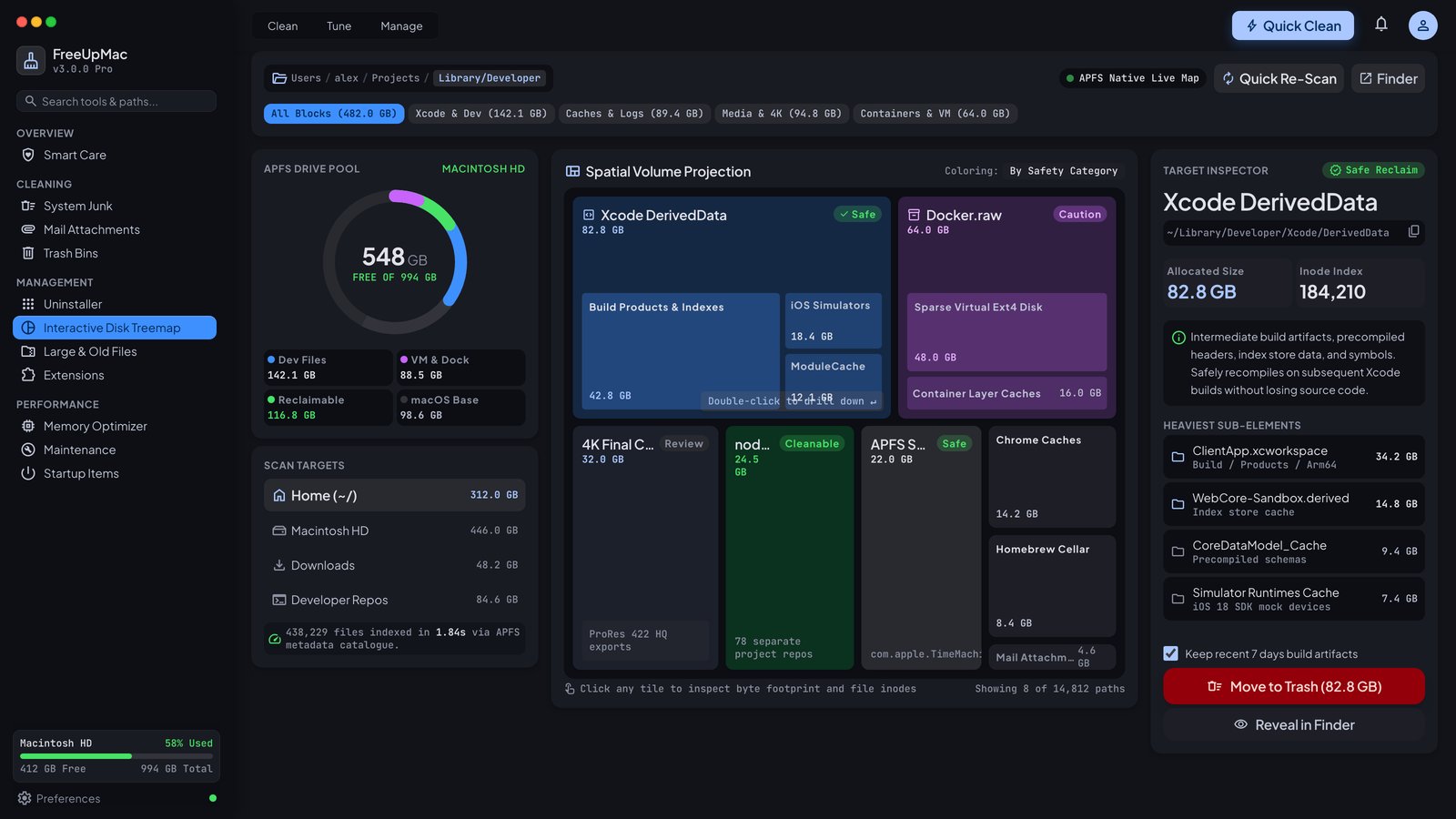
Same job, different defaults
Both tools answer “what is taking space?” with geometry instead of a Finder list. Big folder, big shape.
Differences that matter when you search DaisyDisk alternative:
| DaisyDisk | FreeUpMac | |
|---|---|---|
| Scan | Paid app | Free |
| Visualization | Sunburst / map | Treemap + largest-files list |
| Hog labels | Generic types | Xcode, Docker, caches, backups tagged Safe / Review / Caution |
| Delete | In-app (paid) | Pro: Trash / Bin |
| Snapshots | Not the focus | Pro panel for local TM snapshots |
| Account | Store account to buy | No account to scan |
| Price | Paid license (their current price) | Map $0, Pro $12.99 USD once |
We are not cloning DaisyDisk’s sunburst. Rectangles are easier to compare when two folders are close in size. DaisyDisk’s sweep is prettier for some people. Taste is not a ranking factor; free scan is.
When to stay on DaisyDisk
- You already own it and know the keyboard flow.
- You prefer a sunburst to a rectangular map.
- You want that specific UI and are fine paying their license.
When to try FreeUpMac
- You want to look first on a work Mac without buying another license.
- System Data / Other is the problem and you need a path through caches and snapshots.
- You are a developer and DerivedData, Docker.raw, and
node_modulesshould be labelled, not just “folder.” - You want one small notarized binary, not a suite. (If you wanted a suite, that is CleanMyMac, which is a different comparison.)
Privacy
Both are local-first visualizers when used as intended. FreeUpMac’s rule is strict: paths never leave the Mac. License activation talks to our server only to check a paid key. Details: /privacy.
GrandPerspective and OmniDiskSweeper
Western forums still recommend GrandPerspective (treemap, donation-ware) and OmniDiskSweeper (list by size, free). They are honest tools. They also look like 2012, they do not label Docker.raw, and they are easy to mis-click. FreeUpMac sits between DaisyDisk’s finish and those freeware lists: modern SwiftUI, confirm-to-Trash, no junk score.
If you only need a sortable list, OmniDiskSweeper is enough. If you need a picture, use a map.
Will this import your DaisyDisk license?
No. Different vendor, different key. Scan with FreeUpMac for free and only pay if the workflow fits. We will not pretend we are a DaisyDisk coupon.
Try this once
- Download the Apple Silicon or Intel build.
- Scan Home.
- Find the largest block. If it is a cache, snapshot, or developer folder, you already got the value DaisyDisk sells as a visualizer.
- Unlock Pro only if you want to act from the inspector.
Related: storage almost full, Other storage.
Scanning as a habit
DaisyDisk users often scan before a trip or an OS upgrade. That habit is the whole product category. FreeUpMac is built so the habit does not require a license reminder. Open it, scan Home, close it. Pay later in the year when you actually want to delete from the inspector.
Colors and “heat”
Some visualizers color by file type or by age. FreeUpMac colors by folder and puts risk in the inspector (Safe, Review, Caution). Age is a weak signal for DerivedData — last night’s build is new and still disposable. Type is a weak signal for Docker.raw — it is “one file.” Labels beat rainbows for developer disks.
Keyboard and power users
DaisyDisk has a devoted keyboard crowd. FreeUpMac is mouse-and-click first: select a block, read the path, confirm. If you live in du and tmux, you do not need either GUI. If you want a GUI that will not silently skip Full Disk Access folders, grant FDA and scan This Mac.
Licensing philosophy
A paid visualizer charges for seeing. We charge for acting (Trash, Reveal, snapshots) and give seeing away. That is the alternative. It is a worse business for us if you never delete from the app; that is acceptable. The map still has to be good or you will not come back.
If you outgrow a map and want malware + updaters, that is the CleanMyMac conversation, not a DaisyDisk one.
Related guides
CleanMyMac Alternative vs a One-Time Disk Map
CleanMyMac is a subscription maintenance suite. FreeUpMac is a free on-device treemap with a $12.99 USD Pro unlock. Here is when each product actually fits.
CleanMyMacWhat Other Storage on a Mac Actually Means
Other (and System Data) is not a single folder. It is caches, snapshots, iOS backups, and leftover app files Settings will not list. Here is how to open it.
OtherLocal Time Machine Snapshots Filling Your Mac
macOS keeps local Time Machine snapshots on the internal SSD. They hide under System Data or Other and can eat tens of gigabytes until you delete them.
Time Machine